

AI-Native Obsidian Vault Setup Guide
Instructions for setting up an Obsidian vault as a holistic life operating system covering work, personal life, and everything in between.
14 minute read
This is a living document about how I structure my Obsidian vault, how I maintain my Claude configuration and how I work with Claude Code as an AI-augmented collaborator for my notes.
This document was co-authored by Claude Code.
Instructions for setting up an Obsidian vault as a holistic life operating system. Covers work, personal life, and everything in between. This guide can be followed by an AI agent or human.
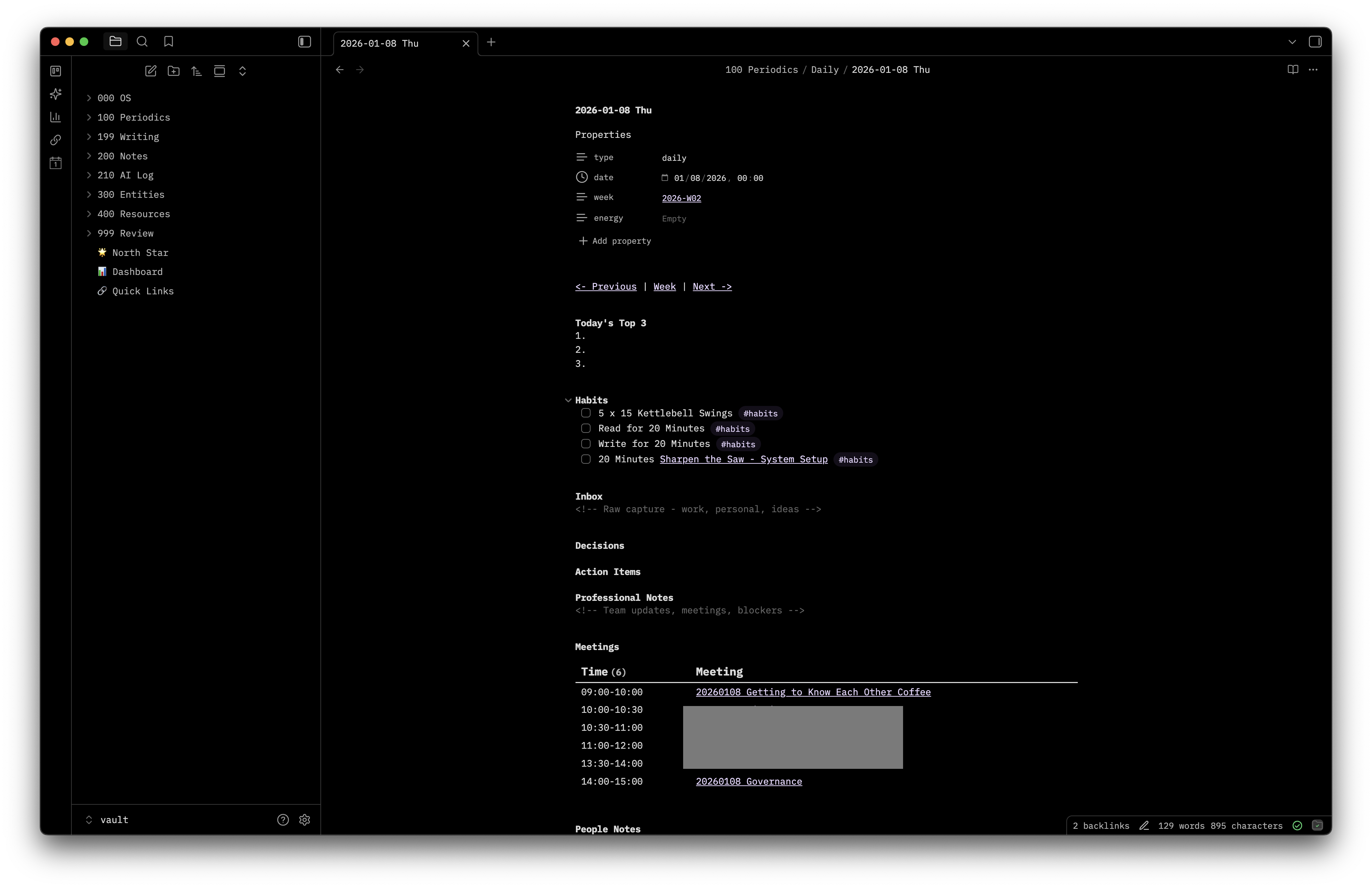
Overview
This vault structure supports:
- Daily/weekly/monthly/quarterly reflection cadences
- Life areas (health, relationships, career, finances, learning, creative, home)
- Goals and projects with area linking
- People tracking with birthday/event reminders
- Team tracking for work
- Events and trips with packing lists
- Action item rollups via Dataview
- Automated week setup via Bun script
- Claude Code integration for sense-making
1. Create Folder Structure
Use numeric prefixes for alphabetical sorting in sidebar:
🌟 North Star.md          # Vision, values, bets, risk register
📊 Dashboard.md           # Daily tactical: events, tasks, goals, projects
🔗 Quick Links.md         # Key docs, dashboards, resources
000 OS/
  ├── Claude/
  │   ├── commands/       # Claude Code slash commands
  │   ├── scripts/        # Automation scripts (Bun/TS)
  │   └── skills/         # Claude Code skills
  └── Templates/          # All Obsidian templates
100 Periodics/
  ├── Daily/              # YYYY-MM-DD ddd
  ├── Weekly/             # GGGG-[W]WW
  ├── Monthly/            # YYYY-MM
  └── Quarterly/          # YYYY-Q#
199 Writing/              # Drafts
200 Notes/                # Reference notes
210 AI Log/               # Claude session logs
300 Entities/
  ├── Areas/              # Life/work areas
  ├── Companies/          # Company notes
  ├── Events/             # Trips, conferences
  ├── Goals/              # Goals with outcomes
  ├── Meetings/           # Meeting notes
  ├── People/             # People tracking
  ├── Projects/           # Projects
  ├── Software/           # Tools & apps
  └── Teams/              # Team notes
400 Resources/
  ├── Blog Posts/         # Blog post references
  ├── Books/              # Book notes
  ├── Courses/            # Course notes
  ├── Highlights/         # Readwise/highlight imports
  ├── Media/              # Movies, shows, etc.
  ├── Podcasts/           # Snipd auto-syncs here
  ├── Prompt Library/     # Human-readable copies of Claude prompts
  │   ├── Commands/       # Slash command prompts
  │   └── Skills/         # Skill prompts
  ├── Roundups/           # Curated link collections
  ├── Videos/             # Video references
  └── Web/                # YYYYMMDD Title format
999 Review/               # Triage folder for unclassified notes
  ├── People (tag-based)/
  ├── Places/
  ├── Quotes/
  ├── Root Files/
  ├── Templates and Meta/
  ├── Unclassified Notes/
  └── Unknown fileClass/
Structure Logic
- Emoji files sort first (🌟 → 📊 → 🔗)
0xx- OS/meta (templates, Claude config)1xx- Time-based periodics2xx- Notes, writing, AI logs3xx- Entities (people, teams, goals, projects, events, companies)4xx- Resources (books, podcasts, web, media, courses)9xx- Review/triage (notes needing classification)
2. Create Templates
Daily Template (000 OS/Templates/Daily.md)
---
type: daily
date: {{date:YYYY-MM-DD}}
week: "[[{{date:gggg-[W]ww}}]]"
---


<< [[{{yesterday}}|← Previous]] | [[{{date:gggg-[W]ww}}|Week]] | [[{{tomorrow}}|Next →]] >>

# Today's Top 3
1.
2.
3.

# Inbox
<!-- Raw capture from Slack, meetings, drive-bys -->

# Decisions

# Action Items
- [ ]

# People Notes
<!-- #praise or #feedback, link [[Person]] -->

# Blockers I'm Creating

# Strategic Check-in
Weekly Template (000 OS/Templates/Weekly.md)
---
type: weekly
week: {{date:gggg-[W]ww}}
date_start: {{monday:YYYY-MM-DD}}
date_end: {{sunday:YYYY-MM-DD}}
---

# {{date:gggg-[W]ww}}

<< [[{{last-week}}|← Previous Week]] | [[{{next-week}}|Next Week →]] >>

# Weekly Top 3
1.
2.
3.

# Team Check-ins

# [Team 1 Name]
<!-- Notes on team trajectory -->

# [Team 2 Name]
<!-- Notes on team trajectory -->

# Weekly Rollup
<!-- Claude Code generates this from daily notes -->

# Reflection

---

# Daily Notes
- [[{{monday}}|Monday]]
- [[{{tuesday}}|Tuesday]]
- [[{{wednesday}}|Wednesday]]
- [[{{thursday}}|Thursday]]
- [[{{friday}}|Friday]]
Monthly Template (000 OS/Templates/Monthly.md)
---
type: monthly
month: {{date:YYYY-MM}}
---

# Monthly Objectives
1.
2.
3.

# [Team 1]
<!-- Progress, trajectory, key decisions -->

# [Team 2]
<!-- Progress, trajectory, key decisions -->

# People
<!-- Performance patterns, growth, concerns -->

# Cross-team
<!-- Dependencies, other team dynamics -->

# Decisions Made

# What Worked

# What Didn't

# Next Month Focus
Quarterly Template (000 OS/Templates/Quarterly.md)
---
type: quarterly
quarter: {{date:YYYY}}-Q
---

# Quarterly Objectives
1.
2.
3.

# [Team 1]
<!-- Where did we start? Where are we now? Where are we headed? -->

# [Team 2]
<!-- Where did we start? Where are we now? Where are we headed? -->

# Team Health
<!-- Hiring, attrition, growth, morale -->

# Strategic Alignment
<!-- Are we working on the right things? Evidence? -->

# Key Decisions

# Lessons Learned

# Next Quarter Focus
Person Template (000 OS/Templates/Person.md)
---
type: person
name:
team:
role:
---

# About

# Action Items
\`\`\`dataview
TASK FROM [[]]
WHERE !completed
\`\`\`

# Notes

# Feedback Log
<!-- #feedback entries -->

# Praise Log
<!-- #praise entries -->
Team Template (000 OS/Templates/Team.md)
---
type: team
name:
---

# Purpose

# Members
<!-- Links to person notes -->

# Current State

# Key Projects

# Dependencies

# Notes
3. Create Core Files
Three emoji-prefixed files at vault root, sorted alphabetically:
🌟 North Star.md (Strategic)
---
type: north-star
---
# Life Vision

# Core Values
1.
2.
3.

# Role Purposes

# Current Bets

# Areas Dashboard

| Area | Status | Focus |
|------|--------|-------|
| [[Health]] | | |
| [[Relationships]] | | |
| [[Career]] | | |

# Risk Register

| Risk | Area | Likelihood | Impact | Mitigation |
|------|------|------------|--------|------------|

# Recurring Prompts
<!-- Daily, weekly, monthly, quarterly reflection questions -->
📊 Dashboard.md (Tactical)
---
type: dashboard
---
[[🌟 North Star]] | [[🔗 Quick Links]]

# Teams
- [[Team 1]]
- [[Team 2]]

# Upcoming Events (Next 3 Months)
<!-- DataviewJS query for events -->

# Open Action Items
\`\`\`dataview
TASK
WHERE !completed AND type = "daily"
SORT file.name DESC
LIMIT 20
\`\`\`

# Active Goals
\`\`\`dataview
LIST
FROM "300 Entities/Goals"
WHERE status = "active"
\`\`\`

# Active Projects
\`\`\`dataview
LIST
FROM "300 Entities/Projects"
WHERE status = "active"
\`\`\`
🔗 Quick Links.md
---
type: quick-links
---
# Work
<!-- Dashboards, docs, key Slack channels -->

# Personal
<!-- Accounts, tools, resources -->
4. Create Week Setup Script
Requires Bun runtime.
000 OS/Claude/scripts/setup-week.ts:
#!/usr/bin/env bun

import { existsSync, mkdirSync, writeFileSync } from "fs";
import { join } from "path";

const VAULT_ROOT = join(import.meta.dir, "../..");

function getMonday(date: Date): Date {
  const d = new Date(date);
  const day = d.getDay();
  const diff = d.getDate() - day + (day === 0 ? -6 : 1);
  d.setDate(diff);
  d.setHours(0, 0, 0, 0);
  return d;
}

function formatDate(date: Date): string {
  return date.toISOString().split("T")[0];
}

function getISOWeek(date: Date): string {
  const d = new Date(date);
  d.setHours(0, 0, 0, 0);
  d.setDate(d.getDate() + 3 - ((d.getDay() + 6) % 7));
  const week1 = new Date(d.getFullYear(), 0, 4);
  const weekNum = Math.round(
    ((d.getTime() - week1.getTime()) / 86400000 - 3 + ((week1.getDay() + 6) % 7)) / 7 + 1
  );
  return `${d.getFullYear()}-W${weekNum.toString().padStart(2, "0")}`;
}

function addDays(date: Date, days: number): Date {
  const result = new Date(date);
  result.setDate(result.getDate() + days);
  return result;
}

function getDayName(date: Date): string {
  return date.toLocaleDateString("en-US", { weekday: "long" });
}

function ensureDir(dir: string): void {
  if (!existsSync(dir)) {
    mkdirSync(dir, { recursive: true });
  }
}

function createWeeklyNote(monday: Date): string {
  const week = getISOWeek(monday);
  const weekStart = formatDate(monday);
  const weekEnd = formatDate(addDays(monday, 6));
  const prevWeek = getISOWeek(addDays(monday, -7));
  const nextWeek = getISOWeek(addDays(monday, 7));

  const dailyLinks: string[] = [];
  for (let i = 0; i < 5; i++) {
    const day = addDays(monday, i);
    dailyLinks.push(`- [[${formatDate(day)}|${getDayName(day)} ${formatDate(day)}]]`);
  }

  return `---
type: weekly
week: ${week}
date_start: ${weekStart}
date_end: ${weekEnd}
---

# ${week}

<< [[${prevWeek}|← Previous Week]] | [[${nextWeek}|Next Week →]] >>

# Weekly Top 3
1.
2.
3.

# Team Check-ins

# [Team 1]

# [Team 2]

# Weekly Rollup

# Reflection

---

# Daily Notes
${dailyLinks.join("\n")}
`;
}

function createDailyNote(date: Date, monday: Date): string {
  const dateStr = formatDate(date);
  const dayName = getDayName(date);
  const week = getISOWeek(monday);
  const prevDayStr = formatDate(addDays(date, -1));
  const nextDayStr = formatDate(addDays(date, 1));

  return `---
type: daily
date: ${dateStr}
week: "[[${week}]]"
---

# ${dayName}, ${dateStr}

<< [[${prevDayStr}|← Previous]] | [[${week}|Week]] | [[${nextDayStr}|Next →]] >>

# Today's Top 3
1.
2.
3.

# Inbox

# Decisions

# Action Items
- [ ]

# People Notes

# Blockers I'm Creating

# Strategic Check-in
`;
}

// Main
const targetDate = process.argv[2] ? new Date(process.argv[2]) : new Date();
const monday = getMonday(targetDate);
const week = getISOWeek(monday);

console.log(`Setting up week: ${week}`);

ensureDir(join(VAULT_ROOT, "100 Periodics/Weekly"));
ensureDir(join(VAULT_ROOT, "100 Periodics/Daily"));

const weeklyPath = join(VAULT_ROOT, "100 Periodics/Weekly", `${week}.md`);
if (!existsSync(weeklyPath)) {
  writeFileSync(weeklyPath, createWeeklyNote(monday));
  console.log(`Created: 100 Periodics/Weekly/${week}.md`);
}

for (let i = 0; i < 5; i++) {
  const day = addDays(monday, i);
  const dayDate = formatDate(day);
  const dailyPath = join(VAULT_ROOT, "100 Periodics/Daily", `${dayDate}.md`);
  if (!existsSync(dailyPath)) {
    writeFileSync(dailyPath, createDailyNote(day, monday));
    console.log(`Created: 100 Periodics/Daily/${dayDate}.md`);
  }
}

console.log("✓ Week setup complete!");
Run with: bun run 000\ OS/Claude/scripts/setup-week.ts [optional-date]
5. Create Mise en Place Skill
000 OS/Claude/commands/mise-en-place.md:
# Weekly Mise en Place

This skill helps you set up your week and get oriented.

# Instructions

1. First, run the setup script to create the weekly and daily notes:

\`\`\`bash
bun run 000\ OS/Claude/scripts/setup-week.ts
\`\`\`

2. After creating the notes, help the user with their weekly mise en place:

# Review Last Week
- Open last week's weekly note and summarize:
  - What got done?
  - What decisions were made?
  - What carried over?

# Set This Week's Intentions
- Help fill in the Weekly Top 3
- Review and update Current Bets in North Star if needed
- Check Risk Register in North Star for anything that needs attention

# Team Prep
- Any 1:1s this week? Note key topics to cover
- Any team meetings? What needs to be addressed?
- Cross-team dependencies to follow up on?

# Calendar Scan
- Ask user about key meetings this week
- Note any prep needed for important meetings

3. End by opening the weekly note in the editor.
Invoke with: /mise-en-place
6. Initialize Team Notes
Create notes in 300 Entities/Teams/ for each team you manage or interface with.
Customization Points
- Daily note sections: Adjust based on what you track daily
- Team check-in sections: Match your actual teams in weekly template
- Recurring prompts: Customize reflection questions in North Star
- Work week: Script creates Mon-Fri; modify loop for different schedules
7. Tag Taxonomy
Tags add queryable metadata inline. Use nested tags for categorization.
Self-Insight Tags
For dashboard queries that surface patterns about yourself:
#insight/pattern      - recurring behaviors/tendencies you notice
#insight/trigger      - what causes emotional reactions
#insight/strength     - discovered strengths
#insight/growth-edge  - areas for development
#insight/energy       - what drains or fuels you
#insight/win          - accomplishments worth noting
#insight/lesson       - things learned from experience
People Tags
For tracking interactions, especially in People Notes sections:
#people/feedback-given   - feedback you gave to someone
#people/feedback-got     - feedback you received
#people/praise-given     - recognition you gave
#people/praise-got       - recognition you received
#people/conflict         - friction or disagreements
#people/connection       - meaningful interactions
#people/idea             - ideas someone sparked
AI Insight Tags
For tracking learnings from AI tools and interactions:
#ai/prompt      - prompt engineering discoveries
#ai/agent       - agentic patterns, multi-step workflows
#ai/workflow    - human+AI collaboration patterns
#ai/tool        - specific tool/model findings
#ai/limitation  - boundaries, failure modes
#ai/technique   - effective techniques
#ai/concept     - theoretical insights
#ai/surprise    - exceeded expectations, unexpected capability
Usage Examples
In daily notes under People Notes:
# People Notes
- [[Alice]] #people/praise-given - great job leading the retro
- [[Bob]] #people/feedback-given - talked about meeting prep
- #insight/trigger - noticed I get defensive when plans change suddenly
Dashboard Queries
Recent insights (last 30 days):
LIST
FROM #insight
WHERE file.cday >= date(today) - dur(30 days)
SORT file.cday DESC
All feedback given:
LIST
FROM #people/feedback-given
SORT file.name DESC
8. Maps of Content (MOC)
MOCs are hub notes that aggregate related content by topic. They surface connections across your vault using dataview queries.
Location
Store MOCs in 200 Notes/ with format: Topic (MOC).md
Examples:
AI (MOC).mdLeadership (MOC).mdHealth (MOC).md
Frontmatter
type: moc
topic: AI
tags: []
MOC Template
---
type: moc
topic: [Topic Name]
tags: []
---

# Overview
<!-- Brief description of this topic and why it matters -->

# Key Concepts
<!-- Core ideas, frameworks, mental models -->

# Notes Mentioning This Topic
\`\`\`dataview
LIST
FROM "200 Notes" OR "100 Periodics"
WHERE contains(file.outlinks, this.file.link) OR contains(file.name, this.topic)
SORT file.mtime DESC
LIMIT 20
\`\`\`

# Tagged Content
\`\`\`dataview
LIST
FROM #[topic-tag]
SORT file.mtime DESC
\`\`\`

# Related Resources
\`\`\`dataview
LIST
FROM "400 Resources"
WHERE contains(file.outlinks, this.file.link) OR contains(tags, this.topic)
SORT file.mtime DESC
\`\`\`

# Open Questions
<!-- What are you still exploring? -->
AI MOC Example
For your AI MOC, use these queries to roll up AI-related content:
# Tagged Insights
\`\`\`dataview
LIST
FROM #ai
SORT file.mtime DESC
\`\`\`

# By Category

## Prompt Engineering
\`\`\`dataview
LIST FROM #ai/prompt SORT file.mtime DESC
\`\`\`

## Surprises & Capabilities
\`\`\`dataview
LIST FROM #ai/surprise SORT file.mtime DESC
\`\`\`

## Limitations
\`\`\`dataview
LIST FROM #ai/limitation SORT file.mtime DESC
\`\`\`

## Tools & Models
\`\`\`dataview
LIST FROM #ai/tool SORT file.mtime DESC
\`\`\`

# Notes Linking to AI Topics
\`\`\`dataview
LIST
FROM "200 Notes" OR "100 Periodics"
WHERE contains(file.outlinks, [[AI (MOC)]])
   OR contains(file.outlinks, [[Claude]])
   OR contains(file.outlinks, [[ChatGPT]])
   OR contains(file.outlinks, [[Suno]])
SORT file.mtime DESC
LIMIT 30
\`\`\`

# Software Notes (AI Tools)
\`\`\`dataview
LIST
FROM "300 Entities/Software"
WHERE contains(tags, "ai") OR contains(tags, "llm")
SORT file.name ASC
\`\`\`
Required Obsidian Plugins
Core Plugins (Enabled)
Dataview
Complex data queries and dynamic lists.
- Powers action item rollups, goal/project lists, upcoming events
- Queries filter by frontmatter fields (
type,status,area) - DataviewJS for advanced calendar/birthday logic in Dashboard
Periodic Notes
Creates daily/weekly/monthly notes from templates.
- Daily: Format
YYYY-MM-DD ddd→100 Periodics/Daily/ - Weekly: Format
GGGG-[W]WW→100 Periodics/Weekly/ - Templates at
000 OS/Templates/ - Integrates with Calendar plugin sidebar
Calendar
Calendar view in sidebar for navigating daily notes.
- Click date to open/create daily note
- Dots indicate existing notes
- Works with Periodic Notes plugin
QuickAdd
Quick capture and templated note creation.
- Rapid Log: Captures timestamped entries to daily note’s
# Inboxsection- Format:
- HH:mm [your text] - Assign to hotkey for quick capture
- Format:
Metadata Menu
Frontmatter field management and validation.
- Autosuggest for field values
- Consistent metadata across note types
- Works with Dataview queries
Kanban
Markdown-backed kanban boards.
- Use for project tracking, workflows
- Cards are internal links to notes
Advanced URI
Extended Obsidian URI schemes.
- Deep links to specific notes/headings
- Automation integration
Regex Find/Replace
Pattern-based find/replace.
- Bulk text transformations
- Useful for restructuring notes
Pinned Notes
Pin frequently-used notes to ribbon.
- Quick access to North Star, Dashboard, Quick Links
Related Prompts
Claude Code prompts that work with this vault structure:
Commands
- Mise En Place Command - Weekly setup and orientation
- Create Event Command - Create events with packing lists
- Top 3 Command - Set daily priorities
- Reflect Command - Guided reflection
- Tag Notes Command - Apply tag taxonomy
- AI Log Command - Log AI sessions
- Expand Writing Command - Expand drafts
- Save Web Command - Save web resources
Skills
- Extract Meetings Skill - Extract meetings from calendar screenshots
- Analyze Daily Skill - Analyze daily note effectiveness